

Do I need both a payment processor and a gateway?
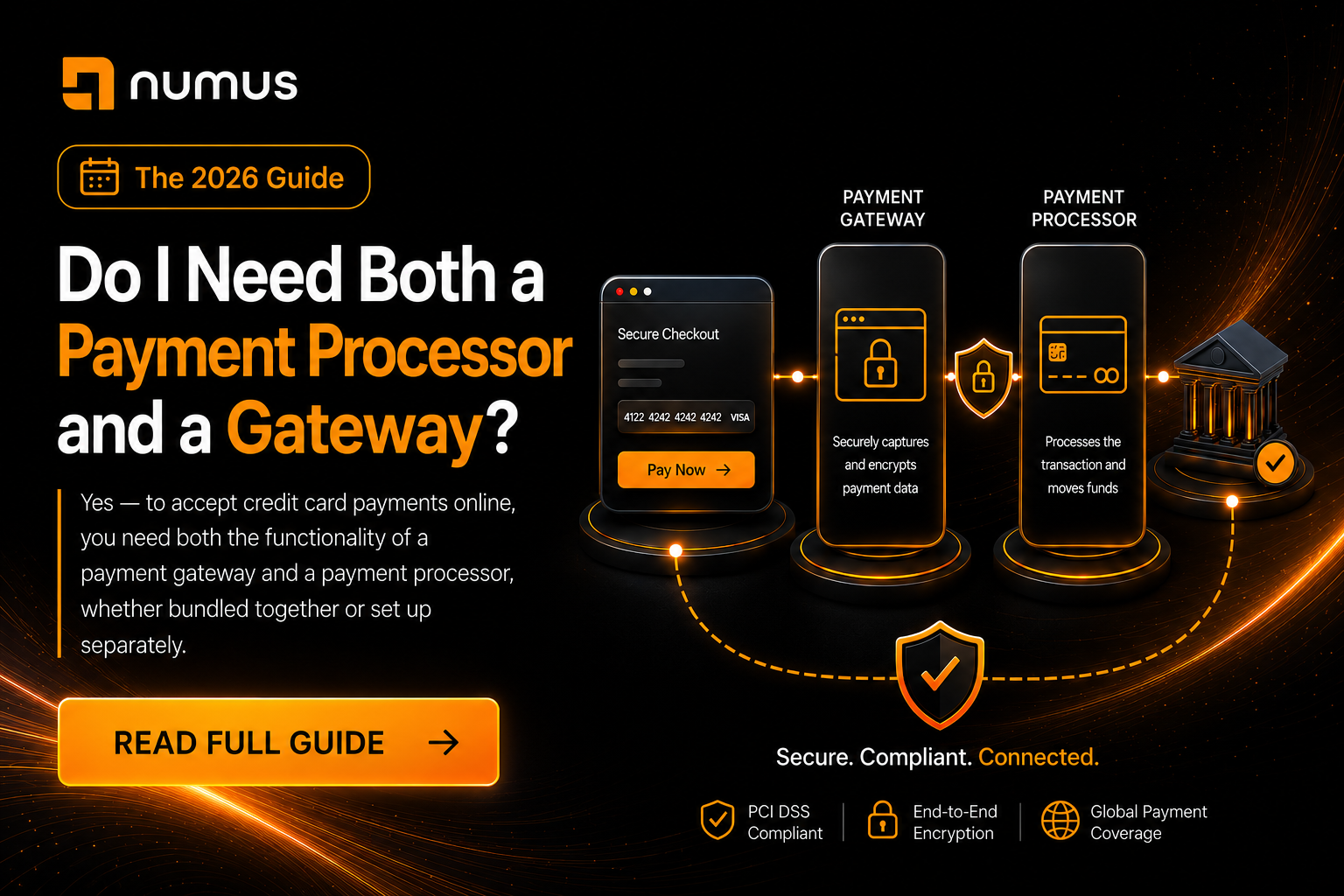
Yes. If you want to accept credit card payments online, you absolutely need both the functionality of a payment gateway and a payment processor (merchant account). The gateway securely transmits the card data from your website, and the processor actually moves the money from the customer’s bank to your bank. However, you do not necessarily need to buy them as two separate services; many modern providers bundle both into an “all-in-one” solution.
For new business owners, the terminology surrounding payment processing is incredibly confusing. You are told you need a gateway, a processor, a merchant account, and an acquiring bank. It sounds like you need to sign four different contracts just to sell a t-shirt online.
This guide clarifies exactly what these technologies do, why you need both functions to process online payments, and whether you should choose an all-in-one bundled solution or a standalone setup.
Table of Contents
- The Roles: Why You Need Both Functions
- The Two Ways to Get Both: Bundled vs. Standalone
- Which Setup Is Right for Your Business?
- The Myth of the “Free” Gateway
- Frequently Asked Questions
1. The Roles: Why You Need Both Functions
To understand why both functions are necessary, you must understand the journey of an online transaction. It is a two-part process: Communication and Settlement.
The Payment Gateway (The Communicator)
When a customer types their credit card number into your website, that data cannot be sent directly to a bank over the open internet. It must be encrypted and securely routed.
- The Role: The payment gateway is the secure software bridge between your website and the financial networks. It encrypts the card data, performs initial fraud checks (like AVS and CVV), and transmits the request to the processor.
- The Analogy: The gateway is the digital equivalent of the physical credit card terminal (the point-of-sale machine) you swipe your card through at a grocery store.
The Payment Processor / Merchant Account (The Settler)
Once the gateway transmits the data, the payment processor takes over.
- The Role: The processor communicates with the card networks (Visa/Mastercard) and the customer’s issuing bank to verify funds. If approved, the processor facilitates the actual transfer of money from the customer’s bank account into your merchant account, and eventually into your business bank account.
- The Analogy: The processor is the financial engine working behind the scenes to actually move the money.
Conclusion: You cannot process an online payment without a gateway to securely capture the data, and you cannot receive the funds without a processor to move the money. You need both functions.
2. The Two Ways to Get Both: Bundled vs. Standalone
While you need both functions, you do not necessarily need to buy them from two different companies. You have two primary options for setting up your payment infrastructure.
Option 1: The All-in-One Payment Aggregator (Bundled)
Modern payment aggregators (also known as Payment Service Providers or PSPs) bundle the payment gateway and the payment processing into a single, seamless product.
- Examples: Stripe, Square, PayPal, Shopify Payments.
- How it works: You sign up for one account. They provide the API/software to capture the card on your website (the gateway function) and they handle the financial settlement on the backend (the processor function).
- Pros: Incredibly easy to set up; instant approval; simple flat-rate pricing; only one company to deal with for support.
- Cons: Higher processing fees at scale; lack of control over the underwriting process (leading to sudden account freezes); you do not get your own dedicated merchant account (you share a master account with thousands of other businesses).
Option 2: The Standalone Setup (Unbundled)
In a standalone setup, you secure a dedicated merchant account from a payment processor, and you connect it to a separate, third-party payment gateway.
- Examples: A Numus Payments Merchant Account connected to an NMI or Authorize.Net Payment Gateway.
- How it works: You sign a contract with a processor for the financial settlement. They provide you with a Merchant Identification Number (MID). You then plug that MID into a third-party gateway software to connect it to your website.
- Pros: Significantly lower processing fees (via Interchange-Plus pricing); dedicated underwriting (meaning your account won’t be suddenly frozen); the ability to switch processors without changing your website’s gateway integration; essential for high-risk businesses.
- Cons: Takes longer to set up (requires an underwriting process); you have two separate vendors (one for the gateway software, one for the financial processing).
3. Which Setup is Right for Your Business?
Choosing between an all-in-one bundle and a standalone setup depends entirely on your business model, processing volume, and risk profile.
When to Choose an All-in-One Bundle (Stripe/Square)
- You are a startup or small business: If you process less than $10,000 to $20,000 per month, the simplicity of an aggregator outweighs the higher per-transaction fees.
- You need to launch today: Aggregators offer instant approval, allowing you to start accepting payments in minutes.
- You are strictly low-risk: If you sell standard retail goods or low-risk software, aggregators are a safe choice.
When to Choose a Standalone Setup (Dedicated Merchant Account + Gateway)
- You process high volume: If you process over $20,000 per month, the flat-rate pricing of aggregators becomes incredibly expensive. A standalone setup with Interchange-Plus pricing will save you thousands of dollars annually.
- You are a High-Risk Business: If you operate in CBD, travel, gaming, adult, or high-ticket coaching, aggregators like Stripe will eventually shut you down. You must use a standalone setup with a high-risk merchant account and a specialized gateway (like NMI).
- You need complex routing: If you need to route transactions to multiple different banks based on currency or volume limits, you need a standalone gateway that supports multi-MID routing.
- You want to own your data: With a standalone gateway, you can tokenize customer cards in the gateway’s vault. If you ever want to switch payment processors to get better rates, you simply plug the new processor into your existing gateway. You don’t lose your customers’ saved credit cards.
4. The Myth of the “Free” Gateway
Many all-in-one providers advertise that their payment gateway is “free.” This is a marketing tactic.
While Stripe or PayPal may not charge a separate $20 monthly “gateway fee,” the cost of the gateway technology is baked into their higher flat-rate processing fees (e.g., 2.9% + $0.30).
In a standalone setup, you will typically pay a transparent monthly fee for the gateway software (e.g., $15 to $25/month) plus a few cents per transaction, but your actual processing rates will be significantly lower. For any business with meaningful volume, paying a small monthly gateway fee to access lower processing rates is the mathematically correct choice.
5. Frequently Asked Questions (FAQ)
Can I use a payment gateway without a merchant account?
No. A payment gateway is just software that transmits data. Without a merchant account (processor) attached to it, the gateway has nowhere to send the transaction for financial settlement. It would be like having a telephone with no phone service connected to it.
Can I use a merchant account without a payment gateway?
If you only accept payments in person using a physical credit card terminal, you do not need a payment gateway. However, if you want to accept payments online, over the phone (MOTO), or via electronic invoicing, you must have a payment gateway to securely capture and transmit the card data.
Does Shopify provide both?
Yes. Shopify Payments is an all-in-one bundled solution (powered by Stripe on the backend). It provides both the gateway functionality for your Shopify store and the processing functionality. However, if you are a high-risk merchant, you cannot use Shopify Payments and must integrate a standalone gateway (like Authorize.Net) into your Shopify store.