

What is the difference between a payment processor and a payment gateway?
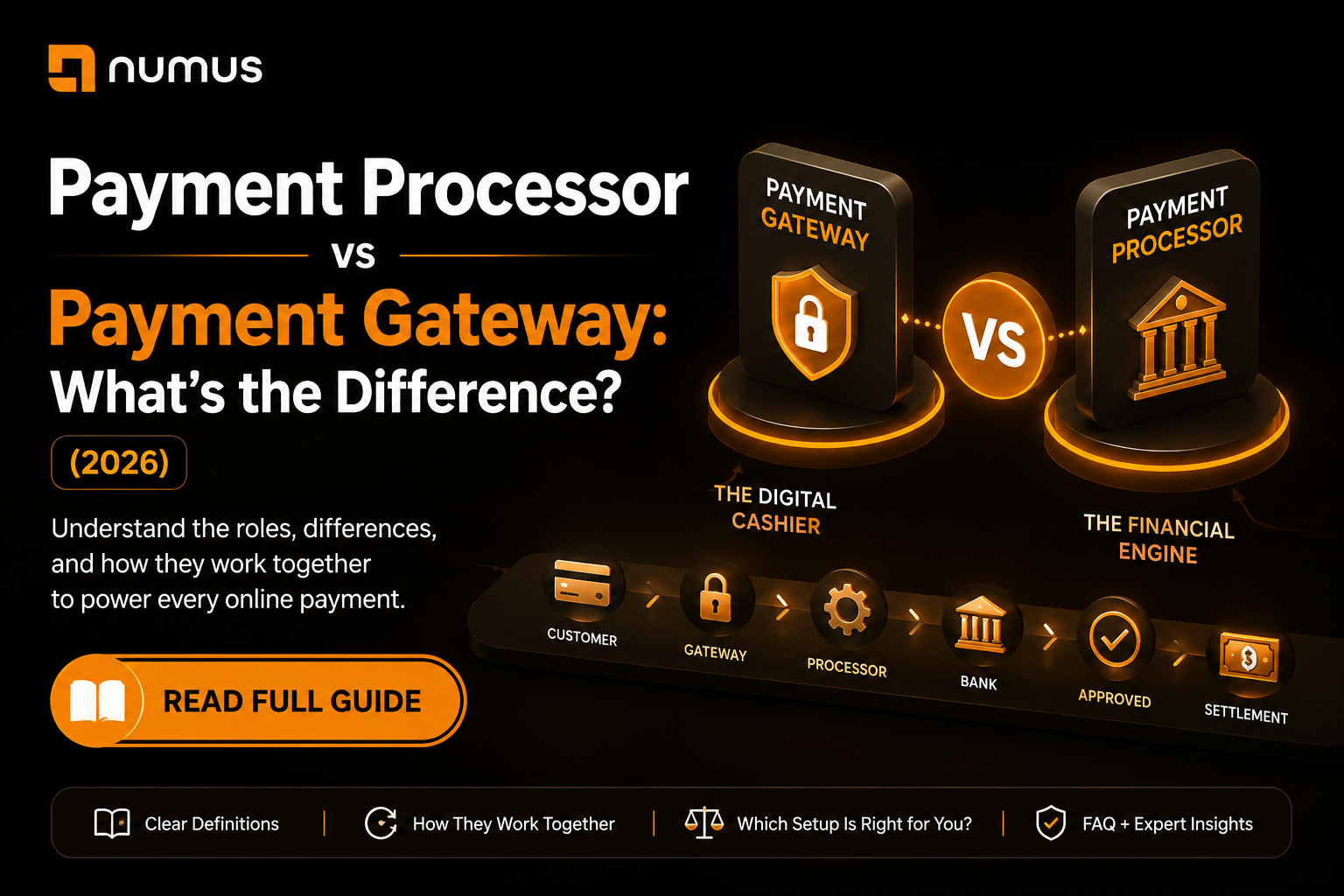
A payment gateway is the front-end technology that securely captures and encrypts a customer’s payment data on a website or app. A payment processor is the back-end engine that receives this encrypted data, routes it through the card networks to the issuing bank for authorization, and handles the settlement of funds into the merchant’s account.
If you are setting up an ecommerce business or upgrading your payment infrastructure, you will inevitably encounter the terms “payment processor” and “payment gateway.” While they are often used interchangeably in casual conversation, they perform entirely different, yet complementary, functions in the lifecycle of a transaction.
Understanding the distinction between a payment processor vs payment gateway is crucial for building a secure, cost-effective, and scalable payment stack. This guide breaks down their distinct roles, how they interact, and whether you need one or both.
Table of Contents
- What is the difference between a payment processor and a payment gateway?
- The Payment Gateway: The Digital Cashier
- The Payment Processor: The Financial Engine
- How They Work Together (The Transaction Flow)
- Do You Need Both?
- Why High-Risk Businesses Need the Traditional Setup
- Frequently Asked Questions (FAQ)
The Payment Gateway: The Digital Cashier
Think of the payment gateway as the digital equivalent of a physical point-of-sale (POS) terminal or a cashier in a retail store. Its primary job is to securely collect payment information from the customer.
Core Functions of a Payment Gateway:
- Data Capture: It provides the interface (the checkout form) where customers enter their credit card number, expiration date, and CVV.
- Encryption and Tokenization: As soon as the data is entered, the gateway encrypts it. Modern gateways use tokenization, replacing the sensitive card data with a unique, meaningless string of characters (a token). This ensures that the actual card data never touches your website’s servers, which is critical for PCI compliance.
- Initial Fraud Checks: Gateways often perform preliminary fraud checks, such as verifying the CVV or running an Address Verification System (AVS) check to ensure the billing address matches the cardholder’s address.
- Transmission: Once the data is secured, the gateway transmits it to the payment processor.
Examples of standalone payment gateways: Authorize.Net, NMI (Network Merchants Inc.), Cybersource.
The Payment Processor: The Financial Engine
If the gateway is the cashier, the payment processor is the armored truck and the clearinghouse combined. The processor operates behind the scenes, connecting your business to the broader financial networks.
Core Functions of a Payment Processor:
- Routing: The processor receives the encrypted data from the gateway and routes the authorization request to the appropriate card network (Visa, Mastercard, Discover, Amex).
- Communication with Banks: The card network forwards the request to the customer’s issuing bank. The issuing bank approves or declines the transaction based on available funds and fraud algorithms.
- Relaying the Response: The processor receives the approval or decline code from the issuing bank and relays it back to the payment gateway (which then displays the result to the customer).
- Settlement: At the end of the day, the processor batches all approved transactions and facilitates the transfer of funds from the issuing banks to your acquiring bank (your merchant account).
Examples of payment processors: Fiserv (First Data), Global Payments, TSYS, Worldpay, and specialized high-risk processors like Numus Payments.
How They Work Together (The Transaction Flow)
To clearly see the difference between a payment processor vs payment gateway, let’s trace a single online transaction:
- The Gateway Acts: A customer clicks “Checkout” on your website and enters their card details. The payment gateway encrypts this data and sends it to the processor.
- The Processor Acts: The payment processor receives the data and routes it through the card network to the customer’s bank.
- The Bank Decides: The customer’s bank approves the transaction.
- The Processor Relays: The payment processor sends the approval code back to the gateway.
- The Gateway Informs: The payment gateway tells your website the payment was successful, and the customer sees a confirmation screen.
- The Processor Settles: Later that day, the payment processor initiates the transfer of funds into your bank account.
The entire authorization process (Steps 1-5) happens in seconds. The settlement process (Step 6) takes 1-2 business days [1].
Do You Need Both?
If you are selling online, yes, you need both the functionality of a gateway and a processor. However, how you acquire them depends on your setup.
Scenario 1: The Bundled Solution (Payment Aggregators)
Companies like Stripe, Square, and PayPal offer “all-in-one” solutions. They act as both the payment gateway and the payment processor (technically, they are payment aggregators).
- Pros: Extremely easy to set up; one point of contact; flat-rate pricing.
- Cons: Higher fees at scale; less control over the underwriting process; higher risk of sudden account freezes, especially for high-risk industries.
Scenario 2: The Traditional Setup (Merchant Account + Gateway)
Established businesses, high-volume merchants, and high-risk businesses typically use a dedicated merchant account (provided by a processor) and connect it to a separate, third-party payment gateway (like Authorize.Net or NMI).
- Pros: Lower processing costs (Interchange-Plus pricing); greater stability; ability to switch processors without changing your gateway (and vice versa); essential for high-risk approval.
- Cons: Requires setting up two separate accounts; slightly more complex integration.
Why High-Risk Businesses Need the Traditional Setup
If you operate in a high-risk industry (CBD, gaming, travel, adult, high-ticket coaching), you cannot rely on bundled solutions like Stripe or PayPal. Their automated underwriting systems will eventually flag your account and shut it down.
You must secure a dedicated high-risk merchant account through a specialized processor. Once approved, your processor will provide you with a compatible payment gateway (or allow you to connect your own) to securely accept payments on your website [2].
Frequently Asked Questions (FAQ)
Is Stripe a payment gateway or a processor?
Stripe functions as both. It provides the gateway technology (the checkout API and elements) to capture the data, and it acts as the processor (specifically, a payment aggregator) to route the transactions and settle the funds.
Can I use a payment gateway without a merchant account?
No. A payment gateway is just the technology to capture and transmit data. It needs a destination to send that data to—which is the payment processor connected to your merchant account. Without a merchant account, the gateway has nowhere to route the transaction for funding.
Which is more expensive, the gateway or the processor?
The processor is significantly more expensive. Processors charge a percentage of every transaction (e.g., 2.5% + $0.10) to cover interchange fees and their markup. Gateways typically charge a flat monthly fee (e.g., $20/month) and a very small per-transaction fee (e.g., $0.05 to $0.10 per transaction) for the use of their software.