

How does payment processing work?
Payment processing works by securely transmitting transaction data from a merchant’s point-of-sale or payment gateway to a payment processor, which routes it through card networks to the customer’s issuing bank for authorization. Once approved, the funds are transferred to the merchant’s acquiring bank during settlement, typically within 1-2 business days.
Understanding how payment processing works is essential for any business owner. Whether you run a local coffee shop or a global ecommerce empire, the ability to accept electronic payments efficiently and securely is the lifeblood of your operations. This comprehensive guide breaks down the complex payment processing ecosystem into clear, actionable steps.
Table of Contents
- How does payment processing work?
- The Payment Processing Flow (7 Steps)
- Key Players in Payment Processing
- Interchange Fees Explained
- Settlement and Funding Timeline
- Common Payment Processing Terms
- Choosing the Right Setup for Your Business
- Frequently Asked Questions (FAQ)
The Payment Processing Flow (7 Steps)
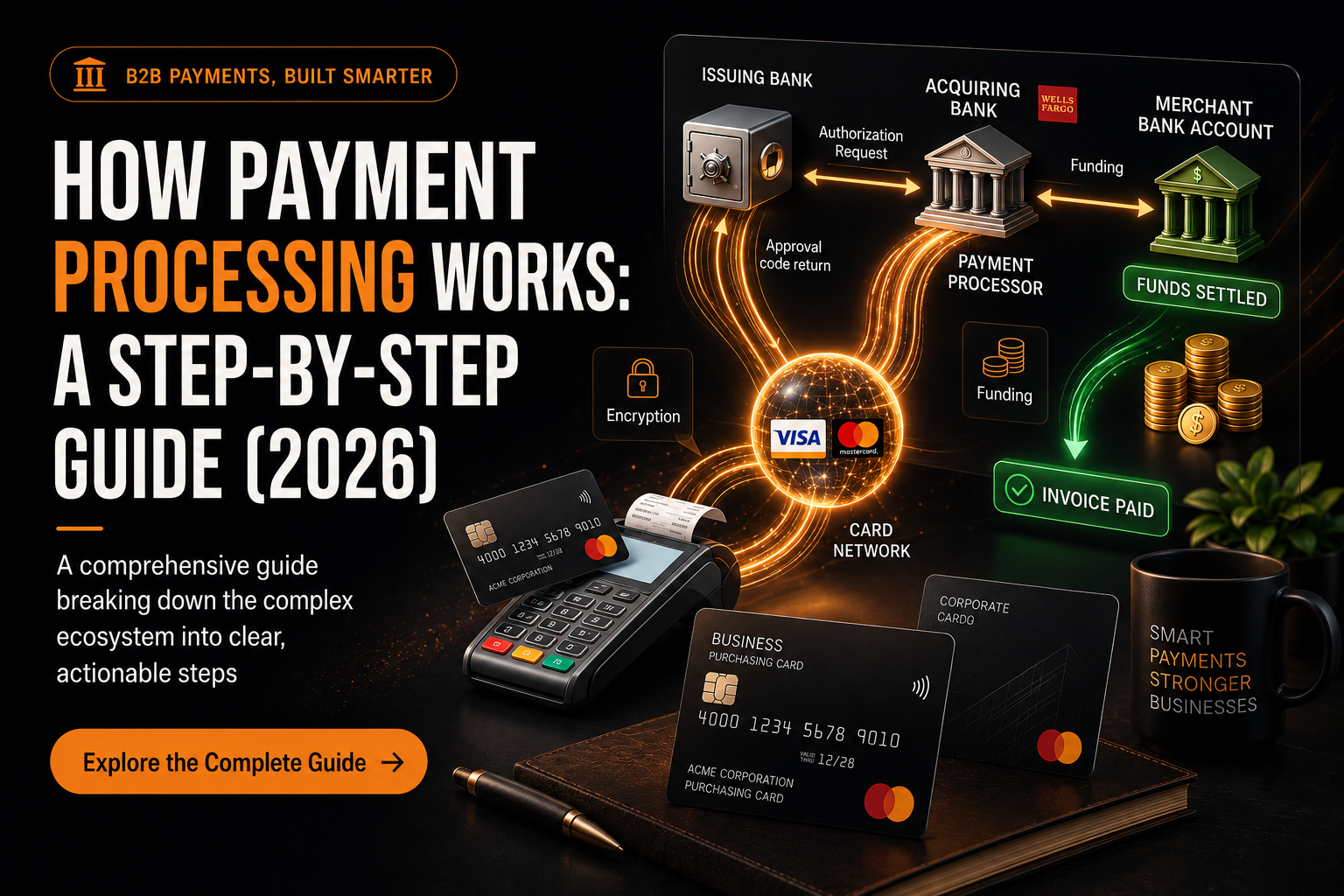
The journey of a single transaction, from the moment a customer swipes their card to the moment funds appear in your bank account, happens in two distinct phases: Authorization (which takes seconds) and Settlement (which takes days).
Phase 1: Authorization
- Initiation: The customer presents their payment method (credit card, debit card, digital wallet) at the point of sale (POS) or enters their details into an online payment gateway.
- Encryption and Transmission: The POS system or payment gateway encrypts the sensitive card data and securely transmits it to the payment processor.
- Routing: The payment processor receives the encrypted data and routes it to the appropriate card network (e.g., Visa, Mastercard, Discover, American Express).
- Verification Request: The card network forwards the authorization request to the customer’s issuing bank (the bank that issued the credit or debit card).
- Approval or Decline: The issuing bank verifies the customer’s identity, checks for sufficient funds or available credit, and runs fraud detection algorithms (like checking the CVV and Address Verification System – AVS). Based on these checks, the bank sends an approval or decline code back through the card network.
- Confirmation: The card network relays the response to the payment processor, which then sends it back to the POS terminal or payment gateway. The customer and merchant see a “Transaction Approved” or “Declined” message. This entire authorization process typically takes less than three seconds [1].
Phase 2: Settlement
- Funding: At the end of the business day, the merchant sends a batch of all approved authorizations to their payment processor. The processor routes these to the respective card networks, which then request the funds from the issuing banks. The issuing banks transfer the funds (minus interchange fees) to the merchant’s acquiring bank. Finally, the acquiring bank deposits the funds into the merchant’s business bank account. This settlement process usually takes 1-2 business days, although some processors offer next-day or even same-day funding [2].
Key Players in Payment Processing
To fully grasp how payment processing works, you must understand the roles of the five key entities involved in every transaction:
| Entity | Role in the Transaction | Example |
| Cardholder | The customer initiating the purchase. | You, buying a coffee. |
| Merchant | The business selling the goods or services. | The coffee shop. |
| Issuing Bank | The financial institution that issued the customer’s card. | Chase, Bank of America. |
| Acquiring Bank | The financial institution holding the merchant’s bank account. | Wells Fargo, specialized acquirers. |
| Card Network | The infrastructure connecting the banks and setting the rules. | Visa, Mastercard. |
Additionally, two technological intermediaries facilitate the communication between these entities:
- Payment Processor: The company that handles the routing of transactions between the merchant, the card networks, and the banks. They provide the necessary hardware (POS terminals) or software.
- Payment Gateway: The digital equivalent of a POS terminal, used for online transactions. It securely captures and encrypts payment data on a website or app before sending it to the processor.
Interchange Fees Explained
Every time you process a credit card transaction, you pay a fee. The largest component of this fee is the interchange fee.
Interchange fees are set by the card networks (Visa, Mastercard) but are paid to the issuing banks. They compensate the issuing bank for the risk of extending credit and the cost of managing the cardholder’s account.
Interchange fees are not a flat rate; they vary wildly based on several factors:
- Card Type: Rewards cards and premium credit cards have higher interchange fees than standard debit cards.
- Transaction Type: Card-Not-Present (CNP) transactions (like online purchases) carry a higher risk of fraud and therefore have higher interchange fees than Card-Present (CP) transactions (like swiping a card in-store).
- Merchant Category Code (MCC): Different industries are assigned different risk profiles, which affects their interchange rates.
Understanding interchange fees is crucial because they form the wholesale cost of processing. Your payment processor will then add their own markup on top of these interchange rates.
Settlement and Funding Timeline
As mentioned in the 7-step flow, authorization happens instantly, but settlement takes time.
- Batching: Merchants typically “batch out” their transactions at the end of the day.
- Clearing: The processor sends the batch to the card networks, which route the individual transactions to the respective issuing banks.
- Funding: The issuing banks transfer the funds to the acquiring bank, which then deposits them into the merchant’s account.
Standard Funding: 1-2 business days. Next-Day Funding: Many modern processors offer next-day funding for transactions batched before a specific cutoff time. Instant Payouts: Some providers offer instant transfers to a debit card for an additional fee.
If you operate in a high-risk industry, your funding timeline might be longer, or your processor might hold a “rolling reserve” (a percentage of your funds held back to cover potential chargebacks) [3].
Common Payment Processing Terms
Navigating the payment processing world requires understanding its specific vocabulary:
- Chargeback: A forced reversal of funds initiated by the cardholder’s bank, usually due to fraud or a dispute. Chargebacks are costly and can jeopardize your merchant account.
- PCI DSS (Payment Card Industry Data Security Standard): A set of security standards designed to ensure that all companies that accept, process, store, or transmit credit card information maintain a secure environment.
- Payment Aggregator (or Payment Service Provider – PSP): A company like Stripe, Square, or PayPal that allows merchants to accept payments without setting up a traditional, dedicated merchant account. They pool many merchants under one master account.
- Merchant Account: A specific type of bank account that allows a business to accept and process electronic payment card transactions.
Choosing the Right Setup for Your Business
How payment processing works for your specific business depends on your setup.
- Small/New Businesses: Often start with Payment Aggregators (Stripe, Square) because they are easy to set up and have transparent, flat-rate pricing. However, they can be more expensive at higher volumes and are prone to sudden account freezes if they detect unusual activity.
- Established/High-Volume Businesses: Usually benefit from a dedicated Merchant Account with Interchange-Plus pricing. This offers lower processing costs at scale and more stability.
- High-Risk Businesses: Must use specialized high-risk payment processors (like Numus Payments) that understand their industry and have relationships with acquiring banks willing to underwrite the risk.
Frequently Asked Questions (FAQ)
What is the difference between a payment processor and a payment gateway?
A payment gateway is the software that securely captures and encrypts payment data online (like a digital card reader). The payment processor is the engine that takes that encrypted data and routes it through the card networks to the banks for authorization and settlement.
How long does payment processing take?
The authorization phase (approving or declining the card) takes only a few seconds. The settlement phase (transferring the actual funds to your bank account) typically takes 1 to 2 business days.
Why do payment processors charge fees?
Payment processing involves multiple financial institutions (issuing banks, acquiring banks, card networks) and technology providers, all of whom take on financial risk and provide infrastructure. The fees compensate these entities for their services, security measures, and the risk of fraud or default.