

Introduction
A payment gateway is a secure software application that acts as the digital equivalent of a physical point-of-sale (POS) terminal. It securely captures, encrypts, and transmits customer credit card data from an ecommerce website or application to the payment processor, enabling the authorization and settlement of online transactions.
In the rapidly expanding world of digital commerce, the ability to accept payments online is the lifeblood of any business. Whether you are running a massive ecommerce storefront, a specialized B2B SaaS platform, or a high-risk subscription service, you cannot process a single credit card transaction without a payment gateway.
Despite its critical importance, the payment gateway is often misunderstood, frequently confused with the payment processor or the merchant account. This confusion leads many business owners to make suboptimal choices, resulting in higher fees, increased fraud risk, and frustrating checkout experiences that drive customers away.
This comprehensive guide will demystify the payment gateway. We will explore exactly how it works, the different types of gateways available, the critical security features you must demand, and how to choose the best option for your specific business model. By the end of this guide, you will have the knowledge necessary to optimize your payment infrastructure, reduce your processing costs, and maximize your online revenue.
Table of Contents
- Introduction
- Chapter 1: What is a Payment Gateway?
- Chapter 2: How Payment Gateways Work (The Technical Flow)
- Chapter 3: Payment Gateway vs. Payment Processor vs. Merchant Account
- Chapter 4: Types of Payment Gateways
- Chapter 5: Essential Payment Gateway Features
- Chapter 6: Top Payment Gateways Compared
- Chapter 7: Choosing the Right Payment Gateway
- Chapter 8: Payment Gateway Security & Compliance
- Chapter 9: Advanced Gateway Features for High-Volume Merchants
- Chapter 10: The Future of Payment Gateways
- Chapter 11: The Numus Payments Advantage
- Chapter 12: Frequently Asked Questions (FAQ)
Chapter 1: What is a Payment Gateway?
A payment gateway is the front-end technology that securely connects an online merchant’s checkout page to the backend payment processing network. Its primary purpose is to encrypt sensitive credit card information, verify the customer’s details, and route the transaction data to the acquiring bank for approval or decline.
To understand the payment gateway, it is helpful to use a physical analogy. When you walk into a brick-and-mortar retail store and purchase an item, you swipe, dip, or tap your credit card into a physical card reader (the Point-of-Sale or POS terminal). That physical machine reads your card data and sends it to the bank.
In the digital world, there is no physical machine. The payment gateway is the software equivalent of that POS terminal. It is the digital bridge between your website and the complex financial networks that move money around the globe.
The Core Functions of a Payment Gateway
While the concept is simple, the actual execution involves sophisticated technology and rigorous security protocols. A modern payment gateway performs three primary functions in milliseconds:
1. Secure Data Capture and Encryption
When a customer enters their credit card number, expiration date, and CVV on your checkout page, that data is incredibly sensitive. If intercepted by hackers, it can be used for massive financial fraud.
The payment gateway’s first job is to capture this data securely. It immediately encrypts the information (often using advanced tokenization), ensuring that the raw credit card numbers are never stored on your website’s servers. This is a critical component of PCI DSS (Payment Card Industry Data Security Standard) compliance, which we will discuss in detail in Chapter 8.
2. Transaction Routing
Once the data is encrypted, the gateway acts as a secure courier. It routes the transaction information from your website to your payment processor. The processor then forwards the request to the customer’s issuing bank (e.g., Chase, Bank of America) via the card networks (Visa, Mastercard).
3. Authorization and Response
The issuing bank reviews the transaction to ensure the customer has sufficient funds and that the card is not reported stolen. The bank then sends an “Approved” or “Declined” response back through the network. The payment gateway receives this response and instantly communicates it to your website, allowing the customer to see a success message or prompting them to try a different payment method.
Why You Cannot Process Payments Without a Gateway
It is a common misconception among new business owners that they can simply connect their website directly to their bank account to accept credit cards. This is technologically and legally impossible.
The financial networks operated by Visa, Mastercard, and the major acquiring banks are highly secure, closed systems. They do not allow direct connections from millions of individual, unsecured ecommerce websites.
The payment gateway serves as the necessary, highly secure intermediary. It translates the data from your website into the specific, encrypted formats required by the banking networks, ensuring that every transaction meets the rigorous security standards mandated by the global financial system.
Chapter 2: How Payment Gateways Work (The Technical Flow)
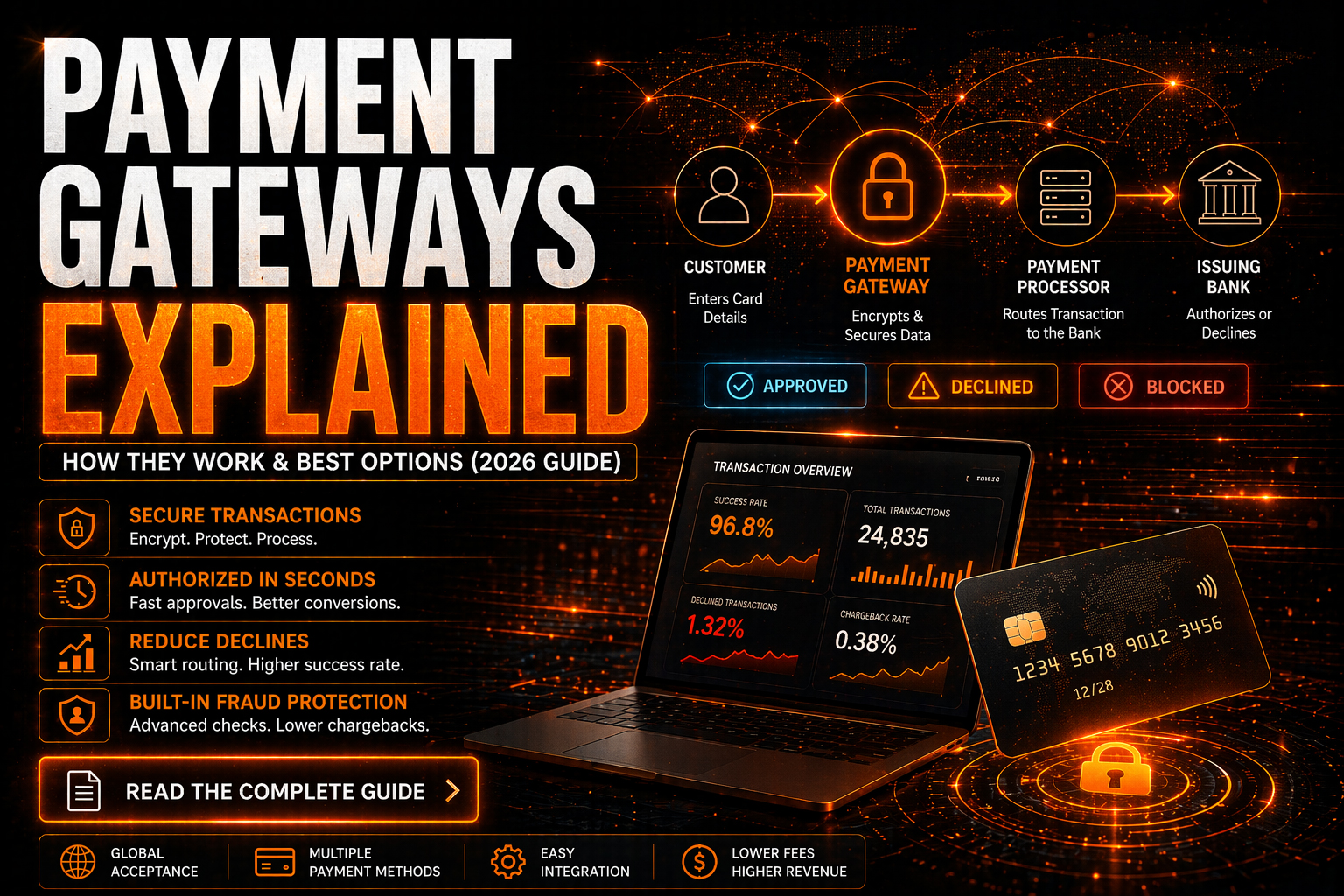
The payment gateway process occurs in milliseconds. The customer enters card data, which the gateway encrypts and sends to the processor. The processor routes it to the issuing bank for authorization. The bank approves or declines the charge, and the gateway relays this response back to the merchant’s website to complete the checkout.
While the customer experiences the checkout process as a single, instantaneous click of a “Buy Now” button, the backend technical flow involves multiple parties and complex data routing. Understanding this flow is essential for troubleshooting failed transactions and optimizing your checkout experience.
The Step-by-Step Transaction Flow
Let’s break down the exact sequence of events that occurs during a standard online credit card transaction.
Step 1: The Customer Initiates the Purchase
The customer browses your ecommerce website, adds an item to their cart, and proceeds to the checkout page. They enter their payment details, including the credit card number, expiration date, CVV (Card Verification Value), and billing address. They click “Submit Order.”
Step 2: The Gateway Encrypts the Data
The moment the customer clicks submit, the payment gateway takes over. It immediately encrypts the sensitive card data. In modern systems, this often involves tokenization, where the actual card number is replaced by a unique, randomly generated string of characters (a token). This ensures that even if the data is intercepted, it is useless to hackers.
Step 3: The Gateway Forwards to the Processor
The payment gateway securely transmits the encrypted transaction data (or the token) to your payment processor (the company that manages your merchant account).
Step 4: The Processor Routes to the Card Network
The payment processor receives the data and routes it to the appropriate card network (e.g., Visa, Mastercard, Discover, or American Express).
Step 5: The Card Network Routes to the Issuing Bank
The card network identifies the specific bank that issued the customer’s credit card (the Issuing Bank) and forwards the authorization request to them.
Step 6: The Issuing Bank Authorizes or Declines
This is the critical decision point. The issuing bank’s automated systems evaluate the transaction based on several factors:
• Available Funds: Does the customer have enough credit or cash in their account to cover the purchase?
• Card Status: Is the card active, or has it been reported lost or stolen?
• Fraud Indicators: Does the transaction match the customer’s typical spending behavior, or does it trigger fraud alerts (e.g., an unusually large purchase from a foreign IP address)?
Based on this evaluation, the issuing bank generates an authorization code (Approval) or a specific decline code (e.g., “Insufficient Funds,” “Do Not Honor”).
Step 7: The Response Travels Back
The issuing bank sends the response code back through the same chain: from the bank, to the card network, to the payment processor, and finally back to the payment gateway.
Step 8: The Gateway Informs the Website
The payment gateway receives the response and communicates it to your website.
• If Approved: The gateway signals your website to complete the order. The customer sees an “Order Confirmed” page, and your system generates a receipt and triggers the fulfillment process.
• If Declined: The gateway signals your website to halt the order. The customer sees an error message (e.g., “Your card was declined. Please try another payment method.”) and is prompted to correct the issue.
This entire eight-step process, involving multiple global networks and complex encryption, typically takes between 1 and 3 seconds.
The Settlement Process (Getting Paid)
It is important to note that the eight-step process described above is only the Authorization phase. At this point, no money has actually moved; the issuing bank has simply placed a temporary hold on the customer’s funds.
The actual transfer of funds occurs during the Settlement phase, which typically happens at the end of the business day.
- Batching: At the end of the day, the payment gateway groups all of your authorized transactions into a single “batch.”
- Submission: The gateway sends this batch to your payment processor.
- Clearing: The processor routes the batch through the card networks to the various issuing banks, requesting the actual transfer of the funds that were previously placed on hold.
- Funding: The issuing banks transfer the funds (minus interchange fees) to your acquiring bank. The acquiring bank then deposits the net funds into your business bank account.
Depending on your processor and your risk profile, this settlement process usually takes between 24 and 72 hours.
Chapter 3: Payment Gateway vs. Payment Processor vs. Merchant Account
A payment gateway is the software that securely captures and transmits card data. A payment processor is the company that routes that data through the financial networks. A merchant account is the specialized bank account where the funds are temporarily held before being deposited into your business checking account.
One of the most common sources of confusion in the payments industry is the interchangeable use of the terms “gateway,” “processor,” and “merchant account.” While they work together seamlessly, they are distinct entities with different roles.
Understanding the difference is crucial, especially when negotiating fees or troubleshooting technical issues.
1. The Payment Gateway (The Communicator)
As we have established, the gateway is the technology layer. It is the software that sits on your website, encrypts the data, and communicates with the processor.
- Analogy: The physical credit card terminal in a retail store.
- Primary Role: Security, encryption, and data transmission.
- Examples: Authorize.Net, NMI, Cybersource.
2. The Payment Processor (The Router)
The payment processor is the financial technology company that actually moves the data through the complex web of card networks and banks. They maintain the direct connections to Visa, Mastercard, and the acquiring banks.
- Analogy: The telecommunications network that connects the physical card terminal to the bank.
- Primary Role: Routing transactions, managing the settlement process, and providing customer support.
- Examples: Fiserv, Global Payments, TSYS.
3. The Merchant Account (The Holding Tank)
A merchant account is a specialized type of bank account provided by an acquiring bank. When a transaction is approved, the funds do not go directly into your standard business checking account. They first go into your merchant account, where fees are deducted and risk is assessed, before being transferred (settled) to your checking account.
- Analogy: A secure holding vault where money is verified before being released to you.
- Primary Role: Holding funds, assessing risk, and managing chargeback liability.
- Examples: Wells Fargo Merchant Services, Chase Paymentech.
The Rise of the “All-in-One” Aggregator
The confusion between these three components has been exacerbated by the rise of Payment Service Providers (PSPs) or “Aggregators,” such as Stripe, PayPal, and Square.
These companies bundle the gateway, the processor, and the merchant account into a single, unified product. When you sign up for Stripe, you are getting their proprietary gateway, their processing services, and access to their master merchant account.
The Aggregator Advantage: Simplicity. You only deal with one company, one contract, and one API integration.
The Aggregator Disadvantage: Lack of control and high risk of account freezes. Because you do not have your own dedicated merchant account (you are sharing Stripe’s master account with millions of other businesses), aggregators are notoriously quick to freeze funds or terminate accounts at the first sign of elevated risk or chargebacks.
For high-risk businesses, B2B enterprises, or companies processing high volumes, relying on an all-in-one aggregator is often a catastrophic mistake. These businesses require the stability of a dedicated merchant account paired with a robust, independent payment gateway.
Chapter 4: Types of Payment Gateways
Payment gateways fall into three main categories: Hosted (redirects customers to a secure third-party page), Self-Hosted (collects data on your site but processes it via API), and API/Non-Hosted (gives you full control over the checkout experience but requires extensive PCI compliance). The right choice depends on your technical resources and desired customer experience.
When integrating a payment gateway into your website or application, you must choose how the customer interacts with the checkout process. This decision impacts your conversion rates, your technical burden, and your PCI compliance requirements.
1. Hosted Payment Gateways (Redirects)
A hosted payment gateway takes the customer away from your website to a secure page hosted by the payment provider to complete the transaction.
How It Works:
- The customer clicks “Checkout” on your website.
- They are redirected to a secure page hosted by the gateway provider (e.g., PayPal, Authorize.Net SIM).
- The customer enters their payment details on this third-party page.
- Once the transaction is approved, they are redirected back to your website’s “Order Confirmation” page.
Pros:
- Easiest Integration: Requires minimal technical expertise to set up.
- Lowest PCI Burden: Because the sensitive card data never touches your servers, the gateway provider handles almost all PCI compliance requirements. You only need to complete a simple Self-Assessment Questionnaire (SAQ A).
- Built-in Trust: Customers often feel secure entering their details on a familiar, trusted platform like PayPal.
Cons:
- Poor User Experience: Redirecting customers away from your site adds friction to the checkout process, which can lead to cart abandonment.
- Lack of Customization: You have limited control over the look and feel of the hosted checkout page, making it difficult to maintain a consistent brand experience.
- Best For: Small businesses, startups, and merchants who prioritize simplicity and low technical overhead over a fully customized checkout experience.
2. Self-Hosted Payment Gateways (Direct Post / Transparent Redirect)
A self-hosted gateway allows the customer to remain on your website throughout the entire checkout process, but the payment data is sent directly to the gateway’s servers, bypassing your own.
How It Works:
- The customer enters their payment details directly on your website’s checkout page.
- When they click “Submit,” the data is securely transmitted (often via an invisible iframe or direct post method) straight to the payment gateway.
- The gateway processes the transaction and sends the response back to your website.
Pros:
- Seamless User Experience: The customer never leaves your website, resulting in higher conversion rates.
- Full Customization: You have complete control over the design and flow of the checkout page.
- Reduced PCI Burden: While you are collecting the data on your site, it is not stored or transmitted through your servers, significantly reducing your PCI compliance scope (typically requiring SAQ A-EP).
Cons:
- Technical Complexity: Requires more development effort to integrate correctly than a simple hosted solution.
- Troubleshooting Challenges: If a transaction fails, it can be more difficult to determine if the issue lies with your website’s code or the gateway’s API.
Best For: Growing ecommerce businesses, B2B platforms, and merchants who want a professional, branded checkout experience without the massive burden of full PCI compliance.
3. API / Non-Hosted Payment Gateways
An API (Application Programming Interface) gateway gives you absolute control over the entire payment process. You collect, store (temporarily), and transmit the data directly from your servers to the gateway’s API.
How It Works:
- The customer enters their payment details on your website.
- Your server captures the data, encrypts it, and sends an API request to the payment gateway.
- The gateway processes the transaction and returns an API response to your server.
- Your server handles the response and displays the appropriate message to the customer.
Pros:
- Ultimate Control: You have complete flexibility to design complex checkout flows, custom recurring billing logic, and deeply integrated user experiences.
- Advanced Functionality: APIs allow you to build sophisticated features like one-click upsells, custom dunning management, and seamless mobile app integrations.
Cons:
- Highest Technical Burden: Requires significant development resources to build and maintain the integration.
- Maximum PCI Compliance: Because sensitive card data touches your servers, you are responsible for the highest level of PCI compliance (SAQ D or a full Report on Compliance). This involves rigorous security audits, vulnerability scanning, and significant ongoing costs.
Best For: Enterprise businesses, large SaaS platforms, and companies with dedicated engineering teams that require highly customized payment flows and have the resources to manage full PCI compliance.
Chapter 5: Essential Payment Gateway Features
A modern payment gateway must offer more than basic transaction routing. Essential features include robust fraud prevention tools (like 3D Secure and velocity filters), seamless integration with major ecommerce platforms, comprehensive reporting dashboards, and support for recurring billing and alternative payment methods.
When evaluating payment gateways, it is crucial to look beyond the basic ability to process a credit card. The right gateway acts as a comprehensive command center for your online revenue, providing tools to protect your business, analyze your data, and optimize your checkout flow.
1. Advanced Fraud Prevention and Risk Management
Fraud is the single greatest threat to an online business. A robust payment gateway must include a suite of tools to detect and block fraudulent transactions before they result in costly chargebacks.
- Address Verification System (AVS): Verifies that the numeric portion of the billing address provided by the customer matches the address on file with the issuing bank.
- Card Verification Value (CVV/CVC): Requires the customer to enter the 3 or 4-digit security code on the card, proving they have physical possession of it.
- Velocity Filters: Monitors the number of transactions attempted from a specific IP address, email, or credit card within a given timeframe. If a fraudster attempts to test hundreds of stolen cards rapidly, the velocity filter will block them.
- 3D Secure (3DS): Adds an extra layer of authentication (like Verified by Visa or Mastercard Identity Check), often requiring the customer to enter a one-time password sent to their phone. Crucially, 3DS shifts the liability for fraudulent chargebacks from the merchant back to the issuing bank.
- Customizable Rules Engine: Allows you to set specific rules based on your business model (e.g., “Block all transactions over $1,000 from IP addresses outside the US”).
2. Seamless Integration and API Support
Your payment gateway must integrate smoothly with your existing technology stack.
- Ecommerce Plugins: The gateway should offer pre-built, officially supported plugins for major platforms like Shopify, WooCommerce, Magento, and BigCommerce.
- Robust API Documentation: If you are building a custom integration, the gateway’s API documentation must be clear, comprehensive, and up-to-date, with code examples in multiple programming languages (e.g., Python, Ruby, PHP, Node.js).
- Sandbox Environment: A dedicated testing environment that allows your developers to simulate transactions, test error handling, and verify the integration before going live.
3. Comprehensive Reporting and Analytics
Data is critical for optimizing your payment strategy. The gateway’s dashboard should provide real-time insights into your transaction flow.
- Detailed Transaction Logs: The ability to view the status of every transaction, including specific decline codes (e.g., “Insufficient Funds,” “Do Not Honor”) to help you troubleshoot failed payments.
- Batch Reporting: Clear visibility into your daily settlement batches, making reconciliation with your bank account straightforward.
- Export Capabilities: The ability to export data in various formats (CSV, Excel, PDF) or automatically sync it with your accounting software (e.g., QuickBooks, Xero).
4. Support for Recurring Billing and Subscriptions
If your business model relies on subscriptions, memberships, or SaaS, your gateway must support automated recurring billing.
- Tokenization: The gateway must securely store customer payment data as a token, allowing you to charge the card on a recurring basis without requiring the customer to re-enter their details.
- Flexible Billing Schedules: The ability to set up daily, weekly, monthly, or annual billing cycles, as well as custom trial periods and prorated upgrades/downgrades.
- Dunning Management: Automated tools to handle failed recurring payments, such as retrying the card after a few days or sending automated emails prompting the customer to update their billing information.
5. Alternative Payment Methods (APMs)
Consumers increasingly expect to pay with methods other than traditional credit cards. A modern gateway should support a variety of APMs to maximize conversion rates.
- Digital Wallets: Apple Pay, Google Pay, and Samsung Pay offer frictionless, one-click checkout experiences, especially on mobile devices.
- ACH / eChecks: For B2B transactions or high-ticket items, accepting direct bank transfers (ACH) significantly reduces processing fees compared to credit cards.
- Buy Now, Pay Later (BNPL): Integrations with services like Klarna, Affirm, or Afterpay, which allow customers to split their purchases into installments while you get paid upfront.
Chapter 6: Top Payment Gateways Compared
The best payment gateway depends on your business model. Stripe and PayPal are excellent for startups seeking quick setup. Authorize.Net and NMI are industry standards for established businesses requiring dedicated merchant accounts. Specialized gateways like Numus Payments are essential for high-risk industries needing robust fraud protection and stable processing.
The payment gateway market is crowded, with hundreds of providers offering varying levels of service, pricing, and technical capabilities. To help you navigate this landscape, we have categorized the top gateways based on their ideal use cases.
1. The Aggregators (Best for Startups and Low-Risk Micro-Businesses)
Aggregators bundle the gateway and the merchant account into a single, easy-to-use platform. They are ideal for getting started quickly but become expensive and risky as you scale.
Stripe
Stripe is the undisputed leader in developer-friendly payment APIs.
- Pros: Exceptional API documentation, seamless integration with almost every ecommerce platform, supports a massive array of international payment methods, and offers advanced tools for subscription billing (Stripe Billing) and marketplace routing (Stripe Connect).
- Cons: Flat-rate pricing (2.9% + $0.30) becomes very expensive at high volumes. They are notoriously aggressive with automated account freezes and terminations, making them entirely unsuitable for high-risk industries or businesses with complex fulfillment models.
PayPal (Braintree)
PayPal offers both its standard consumer-facing wallet and its enterprise-grade gateway, Braintree.
- Pros: Massive consumer trust (adding the PayPal button often increases conversion rates). Braintree offers excellent developer tools and seamless integration with Venmo and major digital wallets.
- Cons: Similar to Stripe, PayPal is an aggregator known for sudden fund holds and account freezes. Their customer support for standard accounts is often difficult to navigate during a crisis.
2. The Traditional Gateways (Best for Established, Low-to-Medium Risk Businesses)
These gateways are “processor-agnostic,” meaning they provide the software technology but require you to bring your own dedicated merchant account. This separation provides greater stability and allows you to negotiate better processing rates.
Authorize.Net (A Visa Solution)
Authorize.Net is one of the oldest and most widely used payment gateways in the world.
- Pros: Incredible reliability, massive ecosystem of pre-built integrations and plugins, robust fraud prevention suite (Advanced Fraud Detection Suite – AFDS), and excellent support for recurring billing (Customer Information Manager – CIM).
- Cons: The user interface is somewhat dated compared to modern competitors like Stripe. It requires a separate merchant account, which adds a step to the onboarding process.
NMI (Network Merchants Inc.)
NMI is a powerful, highly customizable gateway often white-labeled by independent sales organizations (ISOs) and specialized processors.
- Pros: Exceptional flexibility. NMI excels at complex routing, allowing you to connect multiple merchant accounts to a single gateway (load balancing). It offers advanced features like ATRI (Advanced Transaction Routing Interface) and robust support for high-risk merchants.
- Cons: NMI is rarely sold directly to merchants; you typically access it through a reseller or specialized processor, meaning the quality of your support depends heavily on that partner.
3. The Specialized High-Risk Gateways (Best for Complex Verticals)
If your business operates in a high-risk industry (CBD, supplements, adult, gaming, high-ticket coaching), standard gateways and aggregators will eventually shut you down. You need a gateway designed specifically to handle elevated risk and complex compliance requirements.
Numus Payments
Numus Payments provides a specialized gateway integrated with dedicated high-risk merchant accounts.
- Pros: Deep expertise in underwriting complex industries. The gateway includes advanced fraud filters specifically tuned for high-risk verticals, seamless integration with chargeback alert networks (Ethoca/Verifi), and proactive account monitoring to prevent terminations. Numus offers true Interchange-Plus pricing, ensuring transparency.
- Cons: The onboarding process requires manual underwriting and extensive documentation, meaning you cannot start processing instantly like you can with Stripe.
Cybersource (A Visa Solution)
Cybersource is an enterprise-grade gateway focused heavily on global payment management and advanced fraud prevention.
- Pros: Decision Manager, their proprietary fraud prevention tool, is one of the most sophisticated in the industry, utilizing machine learning and Visa’s massive global data network. Excellent for large, multinational corporations managing complex cross-border payments.
- Cons: Highly complex to integrate and manage. The pricing structure is often prohibitive for small to medium-sized businesses.
Chapter 7: Choosing the Right Payment Gateway
Selecting the right payment gateway requires evaluating your business model, technical resources, and risk profile. Startups prioritize easy integration (Stripe), while established businesses need transparent pricing and dedicated merchant accounts (Authorize.Net). High-risk merchants must choose specialized gateways (Numus Payments) with advanced fraud tools to prevent account termination.
Choosing a payment gateway is not a one-size-fits-all decision. The gateway that powers a local bakery’s online ordering system will likely fail spectacularly if used by a high-volume international SaaS company.
To make the right choice, you must systematically evaluate your business needs against the capabilities of the available gateways.
1. Evaluate Your Business Model and Risk Profile
The first and most critical step is an honest assessment of your business’s risk level.
- Low Risk (Retail, Standard Ecommerce, Professional Services): If you sell physical goods with low chargeback rates and standard fulfillment times, you have the luxury of choosing almost any gateway. Your primary concerns will be price and ease of integration.
- Medium Risk (Subscription Boxes, Digital Goods, B2B SaaS): If your business relies on recurring billing or sells digital products, you need a gateway with robust subscription management tools (dunning, tokenization) and strong fraud filters to prevent friendly fraud.
- High Risk (CBD, Supplements, Adult, Gaming, High-Ticket Coaching): If you operate in a high-risk vertical, your choices are severely limited. You cannot use aggregators like Stripe or PayPal, as they will inevitably freeze your funds. You must choose a specialized high-risk gateway (like Numus Payments) that integrates with a dedicated high-risk merchant account and offers advanced chargeback mitigation tools.
2. Analyze Your Technical Resources
Your choice of gateway is heavily influenced by your ability to integrate and maintain it.
- No Technical Resources: If you are using a website builder like Shopify, Wix, or Squarespace, you are largely restricted to the gateways they natively support (often their own white-labeled solutions or major players like PayPal and Authorize.Net).
- Limited Technical Resources: If you use WordPress/WooCommerce or Magento, you can use almost any gateway that offers a pre-built, officially supported plugin. This requires minimal coding but still allows for some customization.
- Dedicated Engineering Team: If you are building a custom application or a complex platform, you need a gateway with a robust, well-documented API (like Stripe or Braintree) that allows your developers to build a fully customized checkout experience.
3. Understand the Pricing Structure
Payment gateway pricing is notoriously complex, often intentionally so. You must understand exactly what you are paying for.
- The Aggregator Model (Flat-Rate): Companies like Stripe and PayPal charge a simple flat rate (e.g., 2.9% + $0.30) for every transaction. This includes the gateway fee, the processing fee, and the merchant account fee. It is easy to understand but becomes very expensive as your volume grows.
- The Traditional Model (Interchange-Plus + Gateway Fee): If you use a gateway like Authorize.Net with a dedicated merchant account, you will pay the wholesale cost of the transaction (Interchange), a small markup to the processor, and a separate fee for the gateway itself.
- Monthly Gateway Fee: Typically $15 to $30 per month.
- Per-Transaction Gateway Fee: Typically $0.05 to $0.15 per transaction (in addition to the processor’s per-transaction fee).
The Golden Rule of Pricing: Always demand Interchange-Plus pricing from your processor, and clearly separate the gateway fees from the processing fees. This transparency allows you to negotiate better rates as your business scales.
4. Assess International Capabilities
If you plan to sell to customers outside your home country, your gateway must support international transactions seamlessly.
- Multi-Currency Support: Can the gateway display prices and process transactions in the customer’s local currency (e.g., Euros, Yen, Pounds)?
- Dynamic Currency Conversion (DCC): Does the gateway offer DCC, allowing the customer to see the exact cost in their home currency at checkout, while settling the funds in your home currency?
- Local Payment Methods: Does the gateway support popular regional payment methods (e.g., iDEAL in Europe, Alipay in Asia, Boleto in Brazil)? Relying solely on Visa and Mastercard will severely limit your international conversion rates.
5. Review Customer Support and Reliability
When your payment gateway goes down, your business stops making money. Reliability and support are non-negotiable.
- Uptime SLA (Service Level Agreement): Look for a gateway that guarantees at least 99.99% uptime.
- Support Channels: Does the provider offer 24/7 phone support, or are you restricted to email tickets? When a transaction fails during a major sales event, you need to speak to a human immediately.
- Dedicated Account Management: For high-volume or high-risk businesses, having a dedicated account manager who understands your specific setup is invaluable for troubleshooting and optimizing your payment flow.
Chapter 8: Payment Gateway Security & Compliance
Payment gateway security relies on robust encryption, tokenization, and strict adherence to the Payment Card Industry Data Security Standard (PCI DSS). By utilizing hosted checkout pages or direct post APIs, merchants can significantly reduce their PCI compliance burden while ensuring customer card data remains secure from interception and fraud.
The primary function of a payment gateway is not just to move money; it is to move data securely. The financial consequences of a data breach are catastrophic, often resulting in massive fines, loss of processing privileges, and irreparable damage to a brand’s reputation.
Understanding the security protocols and compliance requirements associated with your payment gateway is the most critical aspect of managing your online business.
1. Encryption and Tokenization
When a customer enters their credit card information on your website, that data must be protected immediately.
- SSL/TLS Encryption: Your website must have an SSL (Secure Sockets Layer) certificate, ensuring that the connection between the customer’s browser and your server is encrypted (indicated by “HTTPS” in the URL). This prevents hackers from intercepting the data as it travels across the internet.
- Tokenization: This is the gold standard for payment security. When the gateway receives the encrypted card data, it replaces the actual Primary Account Number (PAN) with a unique, randomly generated string of characters called a “token.”
- The token is useless to hackers because it cannot be mathematically reversed to reveal the original card number.
- The gateway stores the actual card data in its highly secure, PCI-compliant vault.
- You (the merchant) only store the token on your servers. When you need to charge the customer again (e.g., for a subscription), you send the token to the gateway, which matches it to the vaulted card data and processes the transaction.
2. PCI DSS (Payment Card Industry Data Security Standard)
PCI DSS is a set of rigorous security standards mandated by the major card brands (Visa, Mastercard, Discover, American Express) to ensure that all companies that accept, process, store, or transmit credit card information maintain a secure environment.
Compliance is not optional. If you accept credit cards, you must be PCI compliant. Failure to comply can result in fines ranging from $5,000 to $100,000 per month and the permanent termination of your merchant account.
The Levels of PCI Compliance
PCI compliance is divided into four levels based on your annual transaction volume:
- Level 1: Over 6 million transactions per year. Requires an annual on-site audit by a Qualified Security Assessor (QSA) and a Report on Compliance (ROC).
- Level 2: 1 to 6 million transactions per year. Requires an annual Self-Assessment Questionnaire (SAQ).
- Level 3: 20,000 to 1 million ecommerce transactions per year. Requires an annual SAQ.
- Level 4: Under 20,000 ecommerce transactions per year. Requires an annual SAQ.
How Your Gateway Choice Impacts Your PCI Scope
The type of payment gateway integration you choose dramatically affects the complexity and cost of your PCI compliance efforts.
- Hosted Checkout (Redirect): If you use a hosted gateway (like PayPal Standard), the customer leaves your site to enter their data. Because the data never touches your servers, your PCI scope is minimal. You typically only need to complete SAQ A (a short, simple questionnaire).
- Direct Post / Transparent Redirect: If the customer stays on your site, but the data is sent directly from their browser to the gateway (bypassing your server), your scope is still relatively low. You typically need to complete SAQ A-EP (slightly more complex, requiring external vulnerability scans).
- API Integration: If you collect the card data on your server and transmit it to the gateway via API, you bear the maximum PCI burden. You must complete SAQ D (a massive, highly technical questionnaire) and implement rigorous security controls, including firewalls, intrusion detection systems, and strict access management.
For the vast majority of businesses, utilizing a Direct Post or Hosted integration is the smartest choice, as it offloads the massive burden of securing raw card data to the payment gateway provider.
3. Fraud Prevention Tools (The Gateway’s Defense)
While encryption protects the data in transit, fraud prevention tools protect your business from accepting stolen cards. A robust gateway must include:
- AVS (Address Verification System): Checks if the billing address entered matches the address on file with the bank. A mismatch is a strong indicator of fraud.
- CVV (Card Verification Value): Requires the 3 or 4-digit code on the card, proving physical possession.
- Velocity Filters: Blocks rapid, repeated transaction attempts from the same IP address or card number, preventing “card testing” attacks by botnets.
- 3D Secure (Verified by Visa / Mastercard Identity Check): Adds a step where the customer must authenticate the transaction with their bank (often via a text message code). This is crucial because it shifts the liability for fraudulent chargebacks from you to the issuing bank.
By selecting a payment gateway with advanced security features and structuring your integration to minimize your PCI scope, you protect your customers’ data, your business’s revenue, and your long-term processing stability.
Conclusion: The Gateway to Your Growth
The payment gateway is far more than a simple piece of software; it is the critical infrastructure that enables your business to participate in the digital economy.
Choosing the right gateway requires a strategic evaluation of your business model, your technical capabilities, and your risk profile.
- Understand the Ecosystem: Recognize the distinct roles of the payment gateway (the secure communicator), the payment processor (the router), and the merchant account (the holding vault).
- Choose the Right Integration: Balance the need for a seamless customer experience with the technical and financial burden of PCI compliance. Direct Post integrations often provide the best middle ground.
- Demand Essential Features: Ensure your gateway offers robust fraud prevention tools (AVS, CVV, 3D Secure), comprehensive reporting, and support for recurring billing if your model requires it.
- Match the Gateway to Your Risk: If you operate a high-risk business, do not rely on aggregators like Stripe or PayPal. You must partner with a specialized high-risk gateway and processor to ensure stability and prevent catastrophic account freezes.
- Prioritize Security: Never compromise on encryption, tokenization, and PCI compliance. The cost of a data breach far outweighs the cost of implementing proper security protocols.
By treating your payment gateway as a strategic asset rather than a mere utility, you can optimize your checkout flow, reduce your processing costs, and build a secure, scalable foundation for your online business.
Ready to upgrade your payment infrastructure with a secure, high-performance gateway tailored to your industry? Contact Numus Payments today for a free consultation and integration review.
Frequently Asked Questions (FAQ)
What is the difference between a payment gateway and a payment processor?
Answer: A payment gateway is the software that securely captures and encrypts credit card data on your website, acting like a digital credit card terminal. A payment processor is the financial company that takes that encrypted data from the gateway and routes it through the card networks (Visa, Mastercard) to the customer’s issuing bank for authorization and settlement.
Do I need both a payment gateway and a merchant account?
Answer: Yes, to process credit cards online, you need both. The gateway securely transmits the transaction data, and the merchant account is the specialized bank account where the funds are temporarily held and risk is assessed before being deposited into your business checking account. Some companies (aggregators like Stripe) bundle these services together, while traditional setups keep them separate for better pricing and stability.
How much does a payment gateway cost?
Answer: Payment gateway costs vary depending on the provider and pricing model. Traditional gateways (like Authorize.Net) typically charge a monthly fee ($15-$30) plus a small per-transaction fee ($0.05-$0.15), which is in addition to your processor’s fees. Aggregators (like Stripe) charge a flat percentage (e.g., 2.9% + $0.30) that includes the gateway, processor, and merchant account fees in one bundled price.
Chapter 9: Advanced Gateway Features for High-Volume Merchants
High-volume merchants require advanced gateway features like intelligent transaction routing, automatic account updater services, and Level 2/Level 3 processing data. These tools optimize approval rates, reduce involuntary churn from expired cards, and significantly lower interchange fees for B2B transactions, directly impacting the bottom line.
As your business scales from processing thousands of dollars a month to millions, the basic functionality of a payment gateway is no longer sufficient. You need advanced tools designed to squeeze every fraction of a percent of efficiency out of your payment infrastructure.
For enterprise and high-volume merchants, the payment gateway transitions from a simple utility to a strategic lever for increasing revenue and reducing costs.
1. Intelligent Transaction Routing (Load Balancing)
If you process high volumes or operate in a high-risk industry, relying on a single merchant account is a dangerous single point of failure. If that account is frozen or terminated, your entire business halts.
Advanced gateways (like NMI or specialized enterprise solutions) offer Intelligent Transaction Routing (often called load balancing or cascading).
How It Works:
- You connect multiple merchant accounts (MIDs) to a single payment gateway.
- You set up specific rules within the gateway to determine which MID processes which transaction.
Use Cases:
- Volume Distribution: Route 50% of transactions to MID A and 50% to MID B to avoid hitting volume caps on either account.
- Risk Mitigation: Route high-risk transactions (e.g., international orders, high-ticket items) to a specialized high-risk MID, while routing low-risk domestic transactions to a standard, lower-cost MID.
- Failover Protection: If MID A goes down or declines a transaction due to a network error, the gateway automatically and instantly reroutes the transaction to MID B, saving the sale.
2. Automatic Account Updater (AAU)
For subscription and recurring billing businesses, involuntary churn—when a customer’s subscription is canceled simply because their credit card expired or was reissued—is a massive drain on revenue.
How It Works:
- The gateway integrates directly with the major card networks (Visa, Mastercard).
- Before processing a recurring charge, the gateway automatically checks the network for updated card information.
- If the customer has received a new card (e.g., due to expiration or a lost card), the network securely provides the new expiration date or card number to the gateway.
- The gateway updates the vaulted token and processes the charge successfully, without the customer ever needing to log in and update their details manually.
The Impact: AAU can recover 5% to 10% of recurring revenue that would otherwise be lost to involuntary churn.
3. Level 2 and Level 3 Processing Data
If you sell B2B (Business-to-Business) or B2G (Business-to-Government), you are likely accepting corporate or purchasing cards. These cards carry significantly higher interchange fees than standard consumer credit cards.
However, Visa and Mastercard offer lower interchange rates for these corporate cards if you provide additional data with the transaction.
How It Works:
- Level 1 Data: Standard consumer data (Card number, expiration, amount, billing zip code).
- Level 2 Data: Requires additional fields, such as customer code and sales tax amount.
- Level 3 Data: Requires extensive line-item detail, including item descriptions, quantities, unit prices, freight amounts, and duty amounts.
The Impact: By using a gateway capable of capturing and transmitting Level 2 and Level 3 data, B2B merchants can reduce their interchange fees by 0.50% to 1.50% per transaction. On high-ticket corporate orders, this translates to massive savings.
4. Network Tokenization
We discussed standard tokenization earlier, where the gateway replaces the card number with a token. Network Tokenization takes this a step further.
How It Works:
- Instead of the gateway generating the token, the card network (Visa, Mastercard) generates the token.
- This network token is tied specifically to the merchant and the customer’s device.
The Impact:
- Higher Approval Rates: Because the token is generated by the network itself, issuing banks trust it more, leading to higher authorization rates.
- Seamless Updates: Network tokens are automatically updated by the card brands when a card expires or is reissued, functioning similarly to an Account Updater service but built directly into the token architecture.
5. Advanced Dispute Management and Chargeback Alerts
Chargebacks are the bane of any merchant’s existence. Advanced gateways integrate directly with chargeback alert networks like Ethoca (owned by Mastercard) and Verifi (owned by Visa).
How It Works:
- When a customer calls their bank to dispute a charge, the bank issues an alert through the Ethoca or Verifi network.
- The gateway receives this alert before the dispute becomes an official chargeback.
- The gateway can automatically pause fulfillment or issue a refund, preventing the chargeback from hitting your merchant account and damaging your processing ratio.
For high-risk merchants, these alert integrations are not optional; they are essential for survival.
Chapter 10: The Future of Payment Gateways
The future of payment gateways involves deeper integration of artificial intelligence for real-time fraud detection, the expansion of open banking and account-to-account (A2A) payments, and the rise of payment orchestration layers that dynamically route transactions across multiple global processors to optimize approval rates and reduce costs.
The payments industry is evolving at a breakneck pace. The gateways of tomorrow will look vastly different from the systems we use today. To future-proof your business, you must understand the trends shaping the next generation of payment technology.
1. Artificial Intelligence and Machine Learning in Fraud Prevention
Traditional fraud prevention relies on static rules (e.g., “Block transactions over $500 from this country”). These rules are rigid and often result in false positives—declining legitimate customers.
The future belongs to AI and Machine Learning (ML).
- Behavioral Biometrics: AI will analyze how a user interacts with the checkout page-typing speed, mouse movements, device orientation-to determine if they are a human or a bot.
- Real-Time Risk Scoring: ML algorithms will analyze thousands of data points across global networks in milliseconds, assigning a dynamic risk score to every transaction. This allows for much more nuanced decision-making, approving borderline transactions that static rules would decline.
2. Open Banking and Account-to-Account (A2A) Payments
Credit cards are expensive for merchants. The interchange fees paid to Visa, Mastercard, and the issuing banks eat into profit margins.
Open Banking regulations (like PSD2 in Europe) are paving the way for Account-to-Account (A2A) payments.
- How It Works: Instead of entering a credit card, the customer authenticates directly with their bank app during checkout. The funds are transferred instantly from the customer’s bank account to the merchant’s bank account via real-time payment rails (like FedNow in the US or Faster Payments in the UK).
- The Impact: A2A payments bypass the card networks entirely, eliminating interchange fees and significantly reducing the cost of acceptance for merchants. Gateways will increasingly integrate these A2A options alongside traditional card processing.
3. Payment Orchestration Layers (POL)
As businesses expand globally, relying on a single payment gateway and processor becomes inefficient. A processor that has high approval rates in the US might have terrible approval rates in Brazil.
Payment Orchestration Layers sit above the payment gateways.
- How It Works: A POL connects to dozens of different gateways, processors, and alternative payment methods worldwide through a single API integration.
- Dynamic Routing: When a transaction occurs, the POL uses AI to determine the optimal route. If a customer in Brazil is buying, the POL routes the transaction to a local Brazilian acquirer, drastically increasing the chance of approval and reducing cross-border fees.
- The Impact: Orchestration allows enterprise merchants to build a highly resilient, globally optimized payment stack without having to build and maintain dozens of individual API integrations.
4. Cryptocurrencies and Central Bank Digital Currencies (CBDCs)
While cryptocurrency adoption for everyday retail purchases remains relatively low, the underlying blockchain technology is transforming B2B and cross-border payments.
- Stablecoins: Gateways will increasingly support settlement in stablecoins (like USDC), allowing merchants to receive funds instantly across borders without the volatility of Bitcoin or the delays of the traditional correspondent banking system.
- CBDCs: As governments roll out Central Bank Digital Currencies, payment gateways will need to adapt to process these new, state-backed digital assets natively.
5. Embedded Finance and Contextual Commerce
The checkout experience is becoming invisible.
- Embedded Payments: Instead of redirecting to a checkout page, payments will be embedded directly into the software or platform the user is already interacting with (e.g., paying for a ride directly within the Uber app, or a business paying an invoice directly within their accounting software).
- Contextual Commerce: Gateways will facilitate purchases at the exact moment of intent, whether that is through a smart speaker, a connected car dashboard, or an augmented reality interface.
The payment gateway of the future will not just be a secure pipe for data; it will be an intelligent, dynamic engine that drives conversion, minimizes risk, and seamlessly connects merchants to the global financial ecosystem.
Chapter 11: The Numus Payments Advantage
Numus Payments provides a specialized, high-performance payment gateway engineered specifically for high-risk and complex business models. Unlike generic aggregators, Numus offers dedicated merchant accounts, intelligent transaction routing, advanced fraud mitigation tools, and proactive chargeback management, ensuring stable, uninterrupted processing and maximized revenue for our clients.
When you choose a payment gateway, you are not just buying software; you are choosing a financial partner. For businesses operating in high-risk verticals, B2B sectors, or high-volume ecommerce, the wrong partner can lead to frozen funds, terminated accounts, and catastrophic revenue loss.
Numus Payments was built to solve the complex challenges that generic payment providers ignore. We understand that your business requires more than just a connection to the card networks; it requires a robust, secure, and highly optimized payment infrastructure.
1. Dedicated Merchant Accounts, Not Aggregated Risk
The fundamental flaw of aggregators like Stripe and PayPal is that they pool the risk of millions of merchants into a single master account. If one merchant in that pool experiences a spike in chargebacks, the aggregator’s automated systems often freeze the funds of other, perfectly healthy businesses to mitigate their overall exposure.
The Numus Solution:
We do not aggregate risk. When you partner with Numus Payments, you receive a dedicated merchant account (MID) underwritten specifically for your business model.
- Stability: Your processing is not affected by the actions of other merchants.
- Control: You own your MID, giving you leverage and transparency.
- Predictability: You will never wake up to an automated email stating your funds have been frozen without explanation.
2. Intelligent Transaction Routing and Load Balancing
For high-volume merchants, relying on a single processing endpoint is a vulnerability. Network outages, bank maintenance, or sudden volume spikes can cause legitimate transactions to fail.
The Numus Solution:
Our advanced gateway features Intelligent Transaction Routing.
- Multi-MID Support: Connect multiple dedicated merchant accounts to your Numus gateway.
- Dynamic Load Balancing: Automatically distribute transaction volume across your MIDs based on predefined rules (e.g., volume caps, ticket size, geographic location).
- Failover Protection: If one acquiring bank experiences an outage, our gateway instantly and seamlessly reroutes the transaction to a backup MID, ensuring you never lose a sale due to technical issues outside your control.
3. Advanced Fraud Mitigation and Chargeback Prevention
High-risk industries are prime targets for sophisticated fraud rings and “friendly fraud” (where a customer makes a legitimate purchase and then falsely claims they did not). Standard AVS and CVV checks are insufficient to stop these attacks.
The Numus Solution:
We provide a comprehensive, multi-layered defense system integrated directly into our gateway.
- Customizable Velocity Filters: Block rapid, repeated transaction attempts from suspicious IP addresses or devices.
- 3D Secure 2.0 (3DS2): Implement frictionless authentication that shifts liability for fraudulent chargebacks away from your business and back to the issuing bank.
- Chargeback Alert Integration: We integrate seamlessly with Ethoca and Verifi. When a customer disputes a charge, you receive an alert before it becomes a formal chargeback, allowing you to issue a refund and protect your merchant account’s health.
4. Transparent Interchange-Plus Pricing
The payments industry is notorious for opaque pricing models, hidden fees, and confusing statements. Tiered pricing and flat-rate models often obscure the true cost of processing, allowing providers to pad their margins at your expense.
The Numus Solution:
We believe in absolute transparency. We offer Interchange-Plus pricing to all our eligible merchants.
- The True Cost: You pay the exact wholesale interchange rate set by Visa and Mastercard.
- The Numus Markup: You pay a small, clearly defined, and transparent markup for our gateway and processing services.
- No Hidden Fees: Our statements clearly delineate every fee, allowing you to see exactly where your money is going and empowering you to optimize your costs.
5. B2B Optimization: Level 2 and Level 3 Processing
If you sell to other businesses or government entities, you are likely accepting corporate purchasing cards. These cards carry significantly higher interchange rates than standard consumer cards.
The Numus Solution:
Our gateway is fully equipped to capture and transmit Level 2 and Level 3 processing data.
- Automated Data Enrichment: Our system automatically populates the required data fields (e.g., tax amounts, line-item details) necessary to qualify for lower interchange rates.
- Massive Savings: By passing this enhanced data, we can reduce your interchange costs by 0.50% to 1.50% on corporate card transactions, directly increasing your profit margins.
6. Expert Underwriting and Dedicated Support
Getting approved for a high-risk merchant account is notoriously difficult. Generic providers rely on automated algorithms that instantly reject complex business models.
The Numus Solution:
We employ a team of expert, human underwriters who understand the nuances of high-risk industries.
- Manual Review: We take the time to understand your business model, your compliance procedures, and your risk mitigation strategies.
- High Approval Rates: Because we understand the risks, we can successfully underwrite and approve businesses that other providers turn away.
- Dedicated Account Management: You are not just a number in a ticketing system. You receive a dedicated account manager who understands your specific setup and is available to assist you with optimization, troubleshooting, and growth strategies.
7. Seamless Integration and Developer-Friendly APIs
A powerful gateway is useless if it cannot integrate with your existing technology stack.
The Numus Solution:
We provide flexible integration options to suit any technical capability.
- Pre-Built Plugins: Seamlessly integrate with major ecommerce platforms like WooCommerce, Magento, BigCommerce, and Shopify (via supported third-party apps).
- Robust APIs: For custom applications, our comprehensive REST APIs provide your developers with the tools they need to build deeply integrated, highly customized payment flows.
- Hosted Payment Pages: For businesses seeking the lowest PCI compliance burden, our secure, customizable hosted payment pages provide a frictionless checkout experience while keeping sensitive data off your servers.
The Numus Commitment
At Numus Payments, we view ourselves as an extension of your business. Your success is our success. We are committed to providing the robust infrastructure, the advanced tools, and the expert support you need to navigate the complex world of online payments confidently.
Do not let a generic payment provider limit your growth or jeopardize your revenue. Partner with a gateway designed for the demands of modern, high-performance commerce.
Contact Numus Payments today to discuss your specific needs and discover how our specialized gateway can optimize your payment infrastructure.
Chapter 12: Frequently Asked Questions (FAQ)
This section addresses the most common questions merchants have about payment gateways, including the differences between gateways and processors, the necessity of merchant accounts, and the costs associated with gateway services. Understanding these fundamentals is crucial for optimizing your payment infrastructure.
What is the difference between a payment gateway and a payment processor?
Answer: A payment gateway is the software that securely captures and encrypts credit card data on your website, acting like a digital credit card terminal. A payment processor is the financial company that takes that encrypted data from the gateway and routes it through the card networks (Visa, Mastercard) to the customer’s issuing bank for authorization and settlement.
Do I need both a payment gateway and a merchant account?
Answer: Yes, to process credit cards online, you need both. The gateway securely transmits the transaction data, and the merchant account is the specialized bank account where the funds are temporarily held and risk is assessed before being deposited into your business checking account. Some companies (aggregators like Stripe) bundle these services together, while traditional setups keep them separate for better pricing and stability.
How much does a payment gateway cost?
Answer: Payment gateway costs vary depending on the provider and pricing model. Traditional gateways (like Authorize.Net) typically charge a monthly fee ($15-$30) plus a small per-transaction fee ($0.05-$0.15), which is in addition to your processor’s fees. Aggregators (like Stripe) charge a flat percentage (e.g., 2.9% + $0.30) that includes the gateway, processor, and merchant account fees in one bundled price.
Can I use multiple payment gateways on my website?
Answer: Yes, using multiple payment gateways is a common strategy for high-volume or international merchants. This approach, often managed through a Payment Orchestration Layer or intelligent routing software, allows you to direct transactions to the gateway most likely to approve them based on geography, currency, or risk profile. It also provides failover protection if one gateway experiences an outage.
What is a hosted payment gateway?
Answer: A hosted payment gateway redirects the customer away from your website to a secure page hosted by the payment provider (like PayPal) to complete the transaction. Once the payment is approved, the customer is redirected back to your site. This method is the easiest to integrate and significantly reduces your PCI compliance burden, as the sensitive card data never touches your servers.
What is a non-hosted (API) payment gateway?
Answer: A non-hosted or API payment gateway allows the customer to remain on your website throughout the entire checkout process. Your server captures the payment data, encrypts it, and sends it directly to the gateway via an API. This provides a seamless, fully branded checkout experience but requires significant technical expertise to integrate and places the maximum PCI compliance burden (SAQ D) on your business.
How do payment gateways prevent fraud?
Answer: Modern payment gateways employ a multi-layered approach to fraud prevention. This includes basic checks like Address Verification System (AVS) and Card Verification Value (CVV), as well as advanced tools like velocity filters (blocking rapid, repeated attempts), 3D Secure (requiring customer authentication via their bank), and machine learning algorithms that analyze hundreds of data points in real-time to assign a risk score to each transaction.
What is tokenization in payment processing?
Answer: Tokenization is a security process where the payment gateway replaces a customer’s sensitive credit card number (Primary Account Number or PAN) with a unique, randomly generated string of characters called a “token.” The actual card data is stored securely in the gateway’s vault, while the merchant only stores the token. This allows merchants to process recurring billing or one-click checkouts without ever storing the actual card data on their servers, significantly reducing the risk of a data breach.
Why do high-risk businesses need specialized payment gateways?
Answer: High-risk businesses (such as CBD, adult entertainment, gaming, or high-ticket coaching) face a higher likelihood of chargebacks and regulatory scrutiny. Standard aggregators like Stripe or PayPal often freeze or terminate accounts in these industries without warning. Specialized high-risk gateways, like Numus Payments, are designed to handle this elevated risk. They integrate with dedicated high-risk merchant accounts, offer advanced fraud mitigation tools tuned for specific verticals, and provide proactive chargeback management to ensure stable, uninterrupted processing.
How long does it take to integrate a payment gateway?
Answer: The integration time depends entirely on the type of gateway and your technical resources. A hosted gateway or a pre-built plugin for platforms like WooCommerce or Shopify can often be set up in a few hours. A fully customized API integration for a complex SaaS platform or enterprise application can take weeks or even months of development and testing to ensure security, reliability, and full PCI compliance.
Related Articles
Payment Gateway Integration Guide: The 2026 Developer’s Manual
White Label Payment Gateways: The 2026 SaaS Integration Guide
Payment Gateway Testing and Go-Live Checklist: A 2026 Merchant Guide